3.05.2016

challengeofnaturephotography Part II: A week of posting images of "larger" animals

Not all of these would be thought of as large animals.  The two ducks in particular.  But during this past (and second) week of posting nature images on Instagram and Facebook, I chose to pick animals that were "larger" than the prior week when I self-imposed a restriction to post only closeups and macros.


Bottoms Up.  Two mallards feeding in the pond right behind my office.

One of three grizzly bear "cubs" hanging around with its mother.
Near Banff, Alberta Canada

Elk cow cleaning calf. Photo taken on the outskirts of Jasper, Alberta Canada

Bald Eagle portrait

Mule Deer. (Ears as big as a mule.)
Photo taken at dusk inside Mesa Verde National Park

Buffalo and calf.  Jackson, Wyoming.


2.28.2016

challengeofnaturephotography Part 1: seven days of small animals and plants

I was recently challenged by a friend on Facebook to post a nature photo per day for a week.  It was all about fun and I have been enjoying seeing many existing (and a few new) friends posting their images as well.

I learned from my daughter how to post images on my Instagram page while simultaneously posting images to Facebook. That makes it really easy to be on both.  At least for me it is easy, because all I post is photos and perhaps a few remarks about a photo.

My Instagram thumbnails from last week:


It was fun to go through my Lightroom catalog looking for nature images.  This was helped by the fact that all my nature images are outlined in green borders.  So, all I needed to do was to use the Lightroom filtering mechanism to isolate all the images with green borders.

I love macros and closeups so I chose seven from the catalog.  (And I am currently posting a second set of seven images on Instagram and Facebook... this time larger animals.  My Instagram page is open for anyone to view.)


2.21.2016

Olympus FW 4.0. Focus Stacking. 60mm macro. F4 with interval at "4"

The other day I reported (here) on using the new focus stacking feature available on a couple of Olympus cameras.  I used the EM-1 and 60mm macro (120mm equivalent) with a focus interval setting of "2" (range is 1 to 10) and an aperture of F2.8 (maximum lens aperture) to keep the background as blurry as possible.

Yesterday I tried the above gear at F4 and an interval setting of "4".  The "4" places a greater distance between focusing planes for each of the 8 bracketing shots. To prevent blur lines between focusing distances I experimented with F4, rather than F2.8, for the greater depth of field provided by a smaller aperture. The backlit palm frond (picture #2 below) shows sharper focus throughout compared with the image taken with with F2.8 at interval "2".

Since I want the blurriest background possible, the next experiment will likely revert to F2.8, but perhaps with an interval of "5", as I have seen "5" recommended on the internet somewhere.


2.09.2016

First Snowfall in Historic Concord

Last Friday, was the area's first snowfall and the day ended with some beautiful post-storm light that made for awesome picture-taking, as I reported in my prior (yesterday) post.

Saturday morning was a beautiful day-after-the-storm.  The sky was a deep blue when I had my morning coffee, so I thought it would be a good idea to go exploring for pictures.

I ended up walking through Concord's Minute Man National Historic Park, which includes the Old North Bridge.  By then the sky had become a bit milky (off and on), but I did get four images I like:


2.08.2016

After the First Snowfall... A Golden Evening

I'm sure not everyone is thrilled with a foot of heavy snow.  But as a snow lover, it made me smile last Friday when the first storm of the season came and Laurie and I could hunker down, have a fire in the fireplace, and drink hot chocolate. (Plus we did not lose electricity like some 35,000 others in the state!)

Things got even better by about 4:30 when the storm slide by and we had some beautiful golden light. I was reading when Laurie called out that I should grab my camera and go outside.  I am so glad she noticed what was happening to the light!

Lots of people saw a similar light show, as there were many images sent into local television stations and several of my friends posted similar images on Facebook and Instagram.

I captured these views across wetlands surrounding (on two sides) our house:


2.05.2016

Olympus FW 4.0. Focus stacking. 60mm macro. F2.8. Interval "2"

I recently downloaded firmware 4.0 onto my Olympus EM-1.  Two of the new features are 1) focus stacking and 2) focus bracketing.

Last Saturday I used the focus stacking feature for the first time, along with the 60mm macro, to photograph plants and flowers at the local botanic garden.


It works like this:

I went to the bracketing menu and set it up for focus stacking.  It will take 8 images and combine them into a final jpg. Fortunately all 8 images are retained as jpg images on the memory card (if you have set up your camera to take jpgs) or as jpg+raw (if, like me, you take your pictures in raw format).  Processing the final image takes quite a few seconds, but the 8 source images are recorded at approximately 8 frames per second.  It is because of this that I felt comfortable hand-holding all of these shots. Unfortunately you can't use a timer; however, when using a tripod, you can use your iPhone or Android as a remote.

You further need to specify in the menu the space between each focused shot, using 1 through 10.  I shot these images at F2.8 using space interval "2".  From what I have read, using F2.8 I might be able to go up to "5" without seeing bands of blurry focus between the eight images.

When it is all said and done, for each composition I had 17 images on the memory card.  Eight jpg and eight raw images, plus the final jpg composite.  I deleted the eight source jpgs.  But the good news is that if you have a potential portfolio image, you can run the raw files yourself through software like Helicon Focus and perhaps obtain a better image than the composite created in-camera.

I suggest being a bit loose in your compositions as the final image is cropped more than you might think.  Some cropping is inevitable since some wiggle room is necessary to account for changes is scale as the focusing distance changes.

I noticed too that the cropped final image is nevertheless a full 16mp, which means it is upsized.  I would prefer it if this did not happen.  Since all of these images, for example, will be viewed small here on the blog (750 pixels wide) or no bigger than HD (1920 pixels wide) or iPad (2048 pixels wide), I see no reason to upsize only to have me downsize for web and computer viewing. There's no need to upsize unless you are making a big print.


1.31.2016

The golden hour on the way home from work

I'm sure my iPhone would have done a decent job with this scene, but I'm glad I take a serious camera with a nice zoom with me going back and forth between home and office. This was slightly cropped from the 28mm equivalent wide angle end of my zoom lens... which pretty much is the same as the 30mm equivalent of my iPhone camera.


... I was driving over the Concord River at about 4 p.m. and saw some nice golden light as the sun went below the tree line behind me. Conveniently, and just in time, there was a boat landing with parking off to the side of the road. I say just in time because in less than a minute the light on the trees on the other side of the river was gone. 


1.28.2016

I hadn't used the Panasonic 35-100 F2.8 zoom in a year

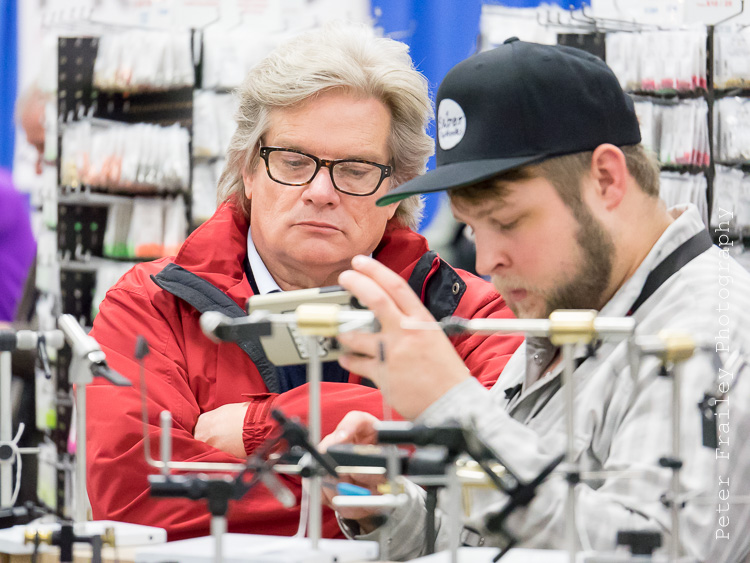
Last weekend I took the Panasonic 35-100 mm zoom (70-200 mm equivalent on a Panasonic or Olympus digital camera) to the annual Fly Fishing Show in Marlborough, MA. I should use this lens more often. It's relatively small and light for an F2.8 lens (just 12.7 ounces and 3.9" long). Because it has internal zooming, it does not extend or "trombone" like so many lesser lenses. I think this actually makes it easier to hold steady.

Panasonic 35-100 F2.8 attached to an Olympus E-M1


I found in looking at my Lightroom catalog of images that the last time I used this lens was a year ago.  It was at the same event, on the same weekend in January. I guess because I don't do much people photography, this lens is a bit of a niche player for me, and so doesn't get a lot of use.  But I do love it!

While I walked around the show randomly photographing people I could see why this focal length range is so important to wedding photographers. I took all my photos at the maximum  F2.8 aperture so as to isolate the subject (i.e. blur backgrounds and foregrounds), something I could not have done with the kit 40-150 F4-F5.6 zoom.  Not to mention that even at F2.8 I sometimes needed ISO 6400 for a decent exposure. 

[You might wonder why I don't take this lens with me for landscapes and travel. Well, 70% of my travel needs are quite adequately taken care of by the Olympus 12-40 F2.8. For the rest, the kit 40-150 mentioned above is quite satisfactory.  It provides a bit more reach too. As expected, for a slower lens, it is even smaller and lighter than the 35-100.  And because I'm usually shooting at F4 to F8 for depth of field purposes, an expensive, heavier, bigger lens is unnecessary.]  

Here are a few of my favorites from the Fly Fishing Show:

The first four were taken at ISO 6400, F2.8 and shutter equal to 1/equiv. focal length.


The next nine were taken at ISO 3200 to 5000


Taken between ISO 500 and 2500