9.12.2010

Just bought the Panasonic LX5. Some thoughts versus my Canon S90.


I just took delivery of the new Panasonic LX5, which just this past week began shipping. This was a real splurge for me as with a list price of $500 it costs more than the Olympus E-520 dSLR I bought last year including two kit lenses. But the price of the LX5 is the same as two other highend point-and-shoots: the Canon G12 and the Nikon P7000.

The LX5 is also an extravagence because I already own the Canon S90, which has many similarities, including the ability to shoot RAW; P,A,S and M modes; ISOs available in 1/3EV intervals; and 3 image bracketing. I have greatly enjoyed the S90 (4,500 images since I bought it in December, 2009) in spite of its ergonomic issues (very smooth surface).

But I have lusted after the LX series ever since I read reviews of the LX2, and with the announcement this summer of the LX5 it seemed its feature-set showed major improvements over the prior models, LX2 and LX3. I just couldn't control myself when I learned in July that Amazon was taking "pre-orders".


Your mileage may vary, but this is my list of the more awesome LX5 features not available on the S90.
  • Wide angle at 24mm effective field of view. I have never had anything wider than 28mm (S90 is 28-105 and with my Olympus dSLR I have the 28-42 kit lens and 28-54 high quality zoom), and I want to see what capabilities and photo opportunities something wider will give.
  • Maximum shutter speed of 1/4000 second compared with the S90 at 1/1600. To my way of thinking this makes the LX5 a bit more of a serious camera, as a couple of times I  have topped off at 1/1600th on the S90. Remember, on these compact cameras, the smallest aperature is usually F8.
  • Minimum shutter of 60sec. compared with 30 sec. on the S90
  • Stronger flash
  • Flash that pops up further away from the center of the lens (nearly 2" away instead of 1.5"). I'm not sure, but I think this will reduce red-eye.
  • Hot shoe for optional EVF. This is big for me. I haven't bought it yet as I am hoping a new one comes out soon with greater resolution than the current EVF-1.
  • 2.5 frames per second will be a lot more helpful when bracketing for HDR, compared with the S90s more anemic .9 fps. This will reduce the chance of subject movement and hand movement between images.
  • Lens adapter can be purchased which will allow me to use the filters I bought for my FZ8. These include closeup lenses (Canon 250D and 500D) and a polarizer.
  • Rubberized grip. The S90 is very slippery. I bet I can hold the LX5 steadier.
  • When the zoom lever is moved, a scale appears on the screen that shows you exactly where you are with respect to focal length, with grid marks for 24, 28, 35, 50, 90. With the S90 you never know what focal length you used. It doesn't even show up in the display when in review mode. The workaround on the S90 is to program the front dial ring to show focal lengths of 28, 35, 50, 85 and 105 as you turn the ring. But if you use the zoom lever you get no readings.
  • Better video capabilities. I don't know much about this. Video has not been important to me.

A couple of other thing occurred to me as I did my first fiddling with the LX5:

  • Because I use AutoISO almost all the time, I disliked the fact that the S90 only shows "autoISO" on the LCD, even when you have half-pressed the shutter button to lock in exposure. You then need to review the recorded image to find out the chosen ISO. With the LX5, the ISO chosen by the camera is displayed on the LCD when the shutter is half pressed.
  • AutoISO can be used when shooting in Manual model. I use this feature on my Olympus dSLR when photographing, for example, butterflies. I set at F11 and 1/400th second to freeze action and get good depth of field. The camera then adjusts ISO to get a good exposure. I am not sure how helpful this will be on a compact camera, but I am glad it is an included feature.
  • In P mode you can set a minimum shutter speed. At family gatherings and cookouts, I can see setting this at 1/100th or 1/125th to freeze slow action. Of course, if there is plenty of light it will move to a higher speed. But if light drops and speed hits the lower limit, ISO will be bumped up. I don't know, maybe this is a gimmick, but I am looking forward to trying it out.
  • This puppy has two four custom settings. Very cool. The S90 isn't too bad, as it has one custom mode.
  • The LX5 has a pre-focus feature that is new to me.  It is called Q-focus and is a choice within the menu system, as is the traditional continuous focus (C-focus).  In Q-focus mode focus begins as soon as the camera senses that it has steadied.  Even without this feature turned on, my sense is that the LX5 focuses faster than the S90.

On the other hand.... While the LX5 "fits" into my pocket (sort of), the S90 "slips" into my pocket (easily).  The S90 is noticeably sleeker with a lens that collapses nearly flush with the body and I love its self-closing lens cover.  Less convenient, the LX5 lens protrudes even when the camera is turned off, and I am sure I will find the lens cover annoying and I am sure I will loose one or two.  The S90 weighs a convenient 6.9 ounces.  This is actually quite a bit less than the LX5's 9.6 ounces.  If you carry your camera in a pants pocket you will notice the difference in weight.  For me, the S90 has a convenience factor that makes it easy to take everywhere.

As far as features lacking on the LX5, the S90 has focus bracketing, which I have had some fun with. In software I have combined three images to increase depth of field. It would be nice if the LX5 had this as well, but other than Canon I don't know of any makers that include this feature. Also, the front dial on the S90 is real cool. I have it set to give me traditional focal lengths of 28, 25, 50, 85 and 105. On the other hand I have set up the LX5 to use the "step zoom" feature which does the same thing by using the zoom lever that surrounds the shutter button.

Time will tell which camera I will prefer.  If the LX5 were the size of the S90, I would sell the S90 immediately.  And if the S90 had a 24mm wide angle, I would never have bought the LX5.  There's definitely a place for the S90 in my pocket.  I don't know yet where the LX5 will fit into my routine.

8.22.2010

A morning photographing butterflies

Earlier this month I spent the morning photographing butterflies at the Butterfly Place in Westford.  I am partial to the wings-up pose, even though the underside of the wing is often dull in color compared with the top of the wing.  Below are three wings-up images.  I have posted about 10 butterfly images from my outing, showing various angles, on my photography Web site here:

http://www.peterfraileyphoto.com/butterflies2010aug7


8.07.2010

The best camera is the one you have with you

I am not saying these pictures of the new covered bridge in Pepperell, MA are good or bad.  But I like them because I took them in a situation where most people (even avid photographers) would not have had a camera with them.  I had just parked my car and was walking down to the river to do some flyfishing when I decided to document the new bridge to send to my fishing buddies.

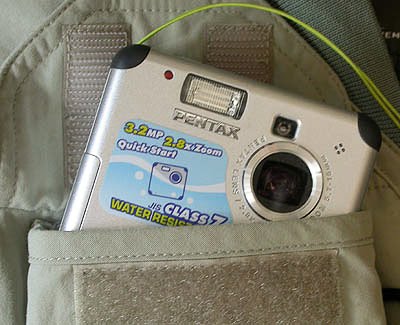
My old Pentax 33WR has been my constant companion while flyfishing, ever since I bought this first-generation water-resistant digital point-and-shoot in the spring of 2004.  This 3.2 megapixel camera probably couldn't be sold for more than $50, but it treads where other cameras wouldn't dare.  It fits nicely into my flyfishing vest and is waterproof enough to have survived at least two complete dunkings.  The last time was two years ago when I slipped off a rock and landed on my back in about 4 feet of water.  I went back to the car to get into dry clothes and realized it had fallen out during the spill.  By the time I retrieved it it had been submerged for about 30 minutes.

One of the things I like about it's feature-set is that there is no option but to shoot in Auto mode.  If it had P,A,S and M modes I probably would spend too much time tinkering.  What a relief it is to merely point the camera and press the shutter. There's even an optical viewfinder should the light be too bright to see the little (and crummy by today's standards) LCD.


For megapixels, 3.2 mp are plenty.  I have made some very nice prints from this camera as large as 9" x 12".  And for a computer monitor or Web use, 3 mp is more then plenty. For example, the maximum size that can be displayed on my 24" monitor is about 2 mp.  And the images below are shown at about 400x650 pixels, which is about 250,000 pixels which is .25mp (that's 1/4 of 1 megapixel!).  And since each pixel is about 2x as large as each of the 10mp on my high-end Canon S90 point and shoot with its slightly larger sensor, the Pentax files do quite well in post processing.  I presume this is because bigger pixels collect more light and therefore more information.

Note the underside of the bridge in the final images.  I was shocked at how easy it was to open the shadows under the bridge (I used Viveza 2.0 software) without adding noticeable noise.  I included the "before" shot as well.


After the underside shadows were opened up with Viveza 2.0 software.  (I also punched up the colors a bit in lightroom.)

Before post-processing

7.24.2010

An ergonomic workaround for the Canon S90

The Canon S90 is a wonderful compact camera.  I take it everywhere and use it when a dSLR is inconvenient or intimidating.  In particular, for images that have strangers in it (and for what is called "street photography") I find the S90 to be unintimidating to others and less likely to draw attention to me. (tip: for real stealth, turn off all sounds).

But the S90 has the same problem that many compact cameras have.  It is sometimes hard to hold.  The S90 is particularly problematic because there are not ribbed or "nubbied" rubber areas to place your fingers.  Even with the aftermarket grip I glued onto the hand-side of the body, I did drop the camera once.  It is very slippery.

Yes, I can use the included strap, but I find straps annoying.  I have pulled pocket cams out of my pocket before, with the strap entangled with my keys. Or, if the strap is hanging out of your pocket it can catch on door knobs and the like, pulling the camera out of your pocket.  It isn't a lot of work, but I really dislike wrapping the stock strap around the camera before slipping it into a pocket. With the contraption shown here, I have solved all these problems.

It is made with a length of old fishing fly-line and a button.  I just slip the button between my fingers and I can operate the camera and adjust buttons and operate the spin dial with my thumb without fear of dropping.  A video would be cool, but the last picture is a result of spinning the camera 180 degrees along its axis with the thumb and fingers of my right hand... importantly, without fear of dropping it!


7.12.2010

Everyone likes blue sky and puffy clouds

I loved the view of the clouds from this bridge, so I eagerly parked the car and walked back to the middle of the bridge.  This is a good example of why I (almost) always keep a camera with me, and is why even the most serious photographer should (IMO) own a decent pocket camera. The camera I used for these images is the 7 ounce Canon S90.

These shots were taken in the P-mode with about 1-stop of negative EV compensation.   This reduced the exposure so that the blue sky would maintain its deep color.  All were shot in RAW and converted to jpegs in Lightroom. 


7.10.2010

It's all about the light

We all know how important the light is when it comes to getting an image with impact.  I was going through a few images from my Colorado trip this past fall.  These two were taken in the morning (about 7:30am) in Rocky Mountain National Park.  I would not have remembered that they are both of the same Elk bull, until I looked at the exif information and discovered that the images were taken about 1 minute apart.  The sun had not yet lifted itself over the mountains to the east when I took the first image, as you can barely see a shadow.  But by the next minute the bull was bounding over a nearby hill to chase away an intruding bugling bull on the other side, and as he reached the top his body picked up the early morning sun.  Your mileage may vary (especially since the first image seems slightly sharper) but to my thinking the second image has far more impact.


The light is better here (but admittedly the composition is too.)

6.09.2010

I've added a new page to the Web site

On my main Web site I've added a "recently added" page, which shows as an additional tab across the top of the home page here: http://www.peterfraileyphoto.com/.

Though all galleries (old and new!) can also be accessed via the "all galleries" tab on the home page, a "recently added" page will make it easier to see what's been added since your last visit.

5.31.2010

A few samples from my Dad's 1955-1956 Kodachromes

In my prior post I outlined the procedure I am using to duplicate my old slides.  But I started with a set of Kodachromes taken by my dad when we left the Boston area and drove out to Los Angeles, where my dad worked in 1955 and 1956.  Below are several of my favorites from that batch of slides (I'm the bigger of the two boys):


5.09.2010

To scan or not to scan old Kodachrome slides (revised)

For a few years I have been wondering what to do with my old slides.  I am now ready to bite the bullet and get them digital-ized. It is just so much easier to show images on a computer or televison or digital projector. I have about 3000 slides taken between about 1968 and 1984. And my dad has some great Kodachromes from the 1950's taken with his Kodak Retina IIIC rangefinder.  As the slides age I am fearful of lost quality.  This is another reason to convert them to digital now.

Scanning seems to be the standard approach to creating digital files from slides, negatives and prints.  To this end I have considered various dedicated film and slide scanners.  The Nikon Coolscan would be a good choice but even the basic one is over $1,000 and currently very hard to find. Many of the best slide scanners have been discontinued, such as those made by Minolta. There are some newer dedicated slide scanners that sell for about $400, and I have been impressed with what I have read about Plustek's OpticFilm line of film scanners.

But scanning takes a lot of time. With the OpticFilm scanner a quick scan can take a minute, while the highest quality scan can take 17 minutes.  And with 3,000 slides I just can't justify the time required.  So, I decided to go in a different direction.  I purchased a "digital duplicator" that screws into the filter threads of a dSLR or any point-and-shoot or ultrazoom camera that has a lens adapter. The one I bought is by Opteka.  Bower makes one as well.  I paid about $50.  The camera I am using for this is a Canon G9.  I already had a lens adapter for the G9 for use with filters, so this was not an additional expense.  I could have used my dSLR gear, but the G9's 3" Liveview LCD with live histogram makes viewing the slide and getting a good exposure simple.  The limitiations of a small-sensor camera like the G9 are not evident during the duplication process because I can shoot at base ISO of 80 and dynamic range has already been reduced during the original image capture. An AC-adapter is also helpful, and I already had one of these for the G9.


The duplicator is basically an extension tube that is screwed into the filter threads.  A 58-52mm stepdown ring was included in the Opteka kit. At the thread end of the tube is an acromatic closeup lens (equivalent to a +10 diopter) and at the other end there is a slide holder.  You just need to point toward your light source and shoot!  Compared with a scanner that takes one to 17 minutes to process the image, with this device the processing is less than 10 seconds (I use the camera's custom self-timer set for 8 seconds). 


Right now I am going through 100 slides my Dad took in 1955-56, when we drove through national parks on our way west to live in California for a year.   The first few were shot in JPEG, but I quickly switched over to shootng in RAW format. ISO is set as low a possible, with the G9 that is 80.  Aperature priority allows me to use the sweet-spot in the lens.  Depth of field is not an issue.  Occasionally the focus point needs to be moved around to a high contrast area of the slide to ensure focus-lock (example: I had to move the focus point from the white area of Niagra Falls as shown in the image above to another area with more contrast). Using the Liveview LCD and the Liveview histogram, I sometimes need to adjust EV compensation to keep away from blown hightlights, but this is rarely needed because the slides themselves have generally been properly exposed.  The files are then imported to Adobe Lightroom for the same tinkering I would do with a scanned image.

The quality of the results is better than I expected.  I am very happy with what I see on my 24" computer monitor, 5"x7" prints are excellent and the one test print I did at 8"x12" was astonishingly good.  I plan to try 15" and 18" prints, to determine how large prints can get before the quality degrades, but have not done so yet. Of course, your mileage may vary, and perhaps I gave the prints high scores because my expectations had been low.  But most of these slides are snapshots (kids at the beach) or "record" shots.  So, they don't need to be of the very best quality, and I am willing to sacrifice a bit of quality (compared with scanning) in exchange for the speed of getting the job done.

My guess is that after duplicating 3000 slides with the Opteka devise, I will have the best 100-200 slides scanned by a professional lab. But this will be at a small fraction of the cost of buying a scanner and will take none of the time.

4.18.2010

25,000 Daffodils at Tower Hill Botanic Garden

The gardens at Tower Hill are beginning to bloom.  The blooming trees are fabulous.  My favorite is the pear tree, which has a unique flowery-peary-smell to it and was covered with very happy bees.  The second to last image below, showing white flowers is from the pear tree.  The final picture, though it shows a bee, is some other pretty flower.

The field which later in the season will be covered with wildflowers was instead covered with Tower Hill's "signature" 25,000 daffodils. The image below captures perhaps half of the field.

The normal focal length snapshots were taken with my pocket camera as I didn't want to switch lenses from the 70-300mm lens on the Olympus.  The closeups were taken with the 70-300.  Typically I set the lens at 150mm  which allows me to fill the frame with a 3-4" subject at a focusing distance of 3.1'.  This is a very nice working distance.

But the closeup of the three daffodils was shot at 300mm due to the fact that these were in the formal garden where I needed to stay on the path.  I think the flowers were about 10 feet away.  The crop was minor, essentially cropping the Olympus's native 4:3 aspect ration to 3:2.